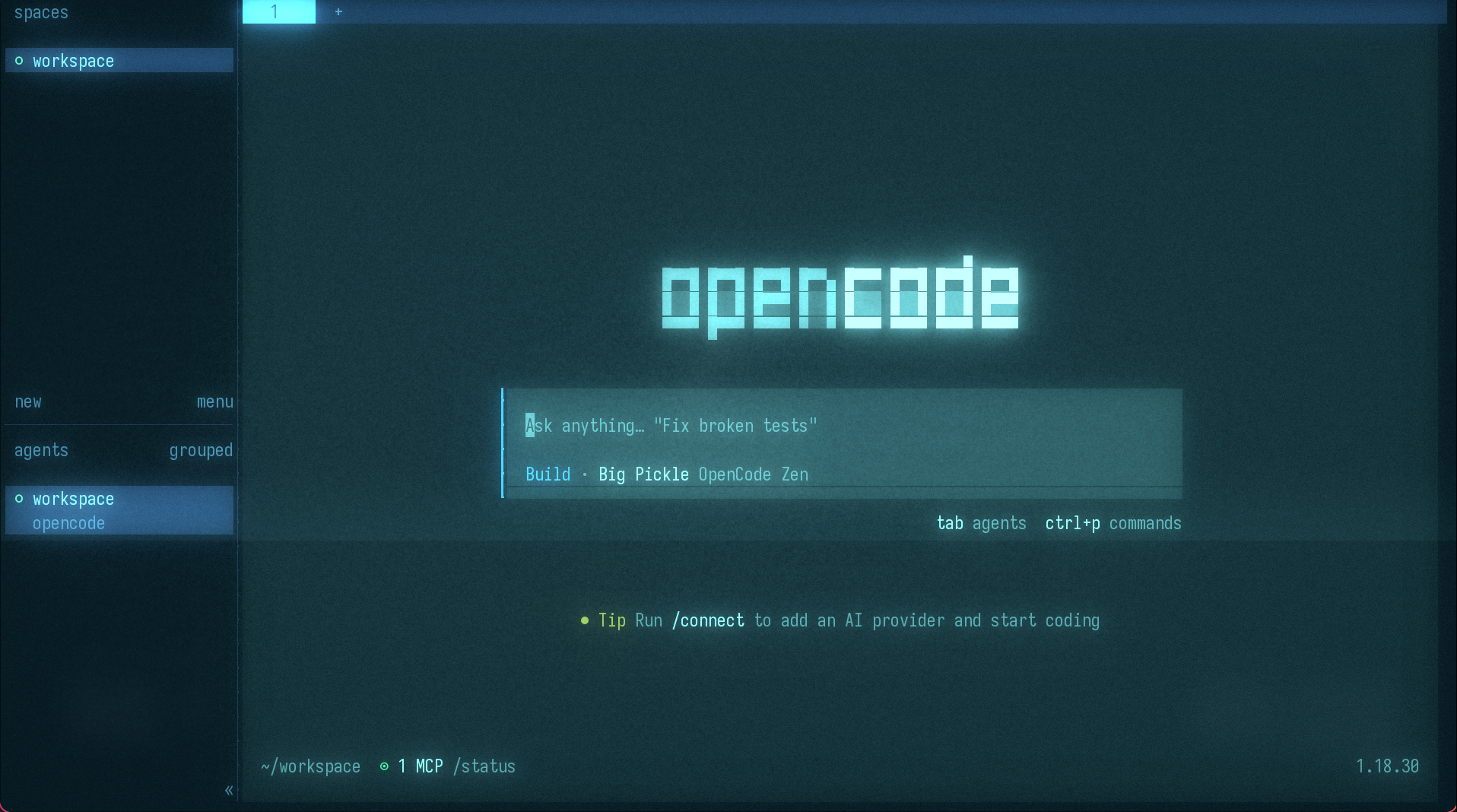
The dignified death of the workstation
Since the beginning of my professional career, the goal has always been to have the
best local workflow and generate code in the fastest and most
efficient way possible. I ended up building complex tmux and zsh
configurations, with a ton of plugins and aliases so I would leave the
terminal as little as possible. I switched to Linux to be able to customize the
desktop, and I even built (literally, I soldered every part) my own keyboard with
shortcuts to depend on the mouse as little as possible and be as efficient as possible.
About two months ago I realized that my workstation was becoming a dumb terminal. And far from worrying me, that seemed like a good sign. For version control I use GitHub, the intelligence of the agents lives in the cloud (OpenAI, Anthropic, Qwen, etc.), and my workstation is just an access point. While the code editor and the terminal are still on my machine, everything else is in the cloud.
Then I had an idea: maybe the computer in front of me shouldn’t be the development environment anymore… Maybe it should only be the means through which I end up reaching it. And I set out to research what options there were to move the environment to the cloud and stop depending on a local machine (infrastructure included).
Necessity is the mother of invention
The first need that came up was having a development environment in the cloud, so I could work from anywhere with any device. But during the research, other (perhaps secondary) needs appeared that matter to me just as much:
- Being able to connect from any machine at any time (duh)
- Processes that keep running even if I turn off the laptop or the workstation
- Being able to separate different projects into different environments, without having to worry about dependency or configuration conflicts
- Giving AI agents the freedom to run commands without
restrictions (YOLO
mode)
without fear that they will run a
dd if=/dev/zero of=/dev/sdaand wipe my whole disk - And if an agent performs a destructive action, restoring a backup shouldn’t take me three days
- Keeping a stable software base: eight years of Debian don’t wash off easily
- And besides, keeping all AI-related software updated to the latest versions, since we get changes every month or even less
- And finally, being able to keep a degree of customization that isn’t too intrusive, because I like having a development environment tailored to my taste
- Keeping distinct identities and credentials for each project, and in that way separating the personal, the hobbies and the work
The stack: remote environment yes, remote desktop no
A while ago I tried to do something with Codespaces, but at the time it didn’t convince me. Maybe the price, not the capability: on GitHub Pro you get 180 compute hours and 20 GB. The storage is already a joke, but leaving that aside, compute is limited when you burn 160 hours on work alone, and then come the personal projects.
Anyway, back to the topic: the first instinct was to rent a VPS, install the basic tools, a bit of Docker here and there and do everything there. It worked, but it felt very basic and like shooting myself in the foot down the road. In fact, it was the same thing I had been doing, except now I was paying for a VPS and more latency.
So I resisted the first impulse and set out to research a bit more. And I found something I really liked: Coder, an open-source platform where developers and AI agents collaborate securely in self-contained environments, using my own infrastructure. Love at first sight. I started trying it out on a virtual machine with templates and different configurations, and that’s how I worked for about a month and a half.
This helped me see some problems and discover what needs and improvements were missing. A couple of weeks ago I got to work, gathered all the requirements and, thinking it over a bit, I came to the conclusion that I wasn’t inventing anything: the answer was right in front of my eyes. Omarchy takes a Linux machine and transforms it into an operating system specialized for developers and agents. I was looking for something conceptually similar, but without the machine having to sit on my desk.
With Omarchy: Computer → Omarchy → Dev OS
And that’s how ENIAC was born, which turns any machine or VPS into a development environment. Your code, tools, configuration, state and AI agents live in a reproducible workspace in the cloud, ready to work no matter where you connect from.
My approach: VPS / Remote Compute → Eniac → Remote Dev OS
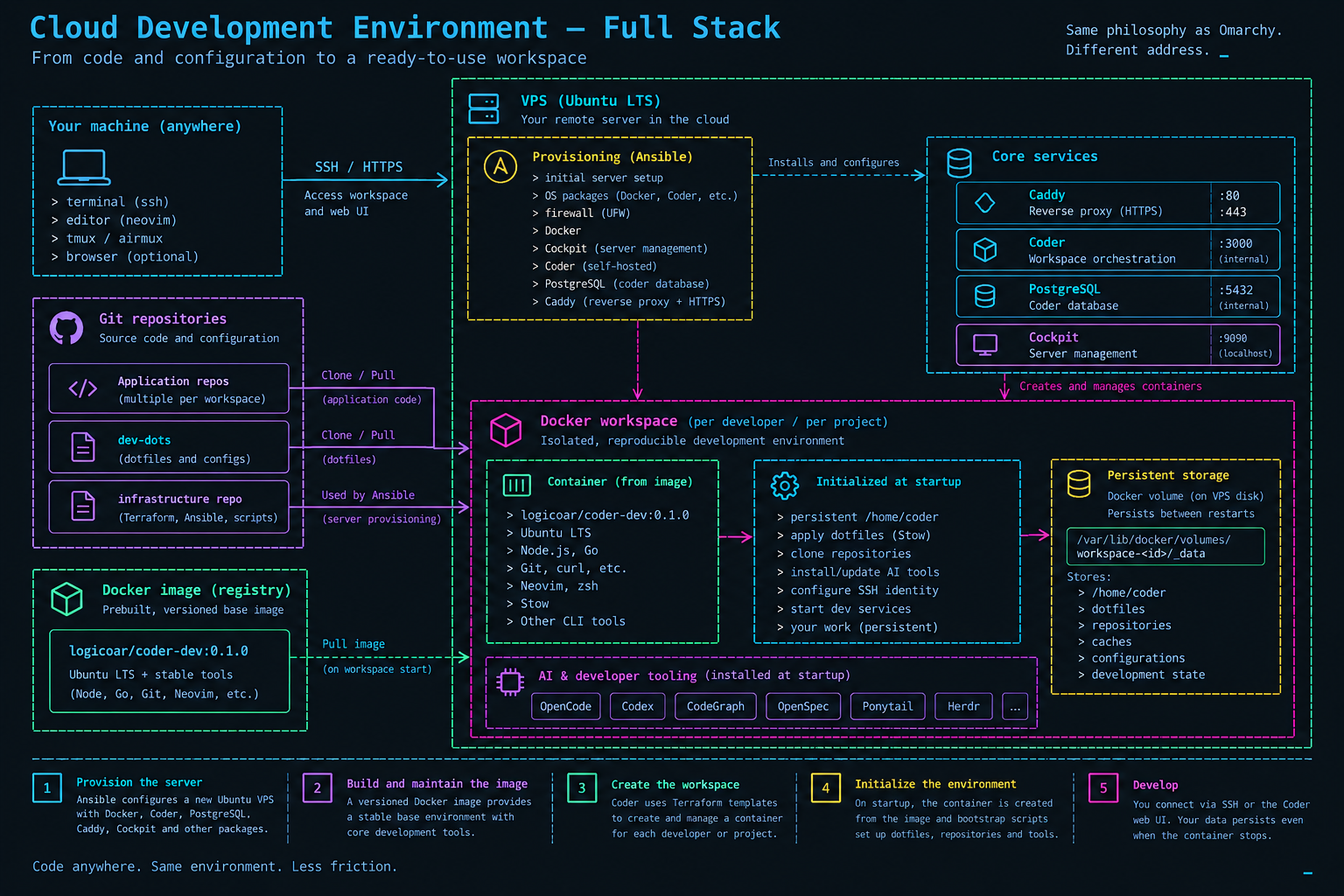
As I said, the idea is quite simple. These are the ingredients:
- A Linux VPS or remote server
- An Ansible playbook to install and configure everything
- A Docker image with the stack needed for development
- A Coder template to create an environment with everything ready
- The user brings their configurations, repositories and credentials, and the environment is deployed in the cloud with everything ready to work
- Optionally, a domain name or subdomain to access the development environment from anywhere with a nice name and SSL
By just running Ansible and loading the Coder template (everything included), you’re ready to work. And the best part is that the environment is customizable, reproducible and, above all, isolated. AI agents can run without fear of breaking anything: if there are problems, the environment restarts easily.
Decisions, decisions… What I had to leave out
As with everything in engineering, life is a trade-off. In this case, I had to make some decisions to arrive at a balanced system between functionality, security and ease of use. The “yeses” are easy: when something is clear in the specifications, that’s usually enough. But when it comes to infrastructure design, the hardest part is deciding what NOT to automate. Some of the decisions I made:
- No Docker-in-Docker: an isolation boundary already existed. Adding another daemon didn’t solve a real problem.
- No
latestin the base image: the base must change explicitly. - No AI tools baked into the image: Codex, OpenCode, CodeGraph and friends change too fast. Better to initialize them at startup.
- No automatic repo resets: if a repo exists, it’s preserved. The automation shouldn’t destroy local work to achieve some supposed declarative purity.
- No plaintext secrets per workspace: the identity is selected declaratively, but the credentials are materialized at runtime.
The design was starting to feel solid on paper. Reality, naturally, had other plans.
The good (already told), the bad and the ugly
All lovely up to this point. As a good professional, I have to touch on these parts to avoid selling the project as the second coming of Christ. And the truth is that not everything is rosy.
The first issue is latency, and I have mixed feelings about it. The bad first: logically, the experience isn’t the same when you type locally, versus on a server inside your own LAN, versus on a server thousands of kilometers away. In the last case, with a basic SSH connection, me being in Argentina and the server in Canada, it wasn’t the best experience. By tuning the connection a bit or using Mosh, it’s honestly completely usable. It’s not native, but it’s functional. And the good part is that latency isn’t a problem for the agents. Besides, being a VPS, the transfer speed is much higher than my local provider’s. Starlink is good, but it doesn’t reach the server’s 3Gbps. Cloning repos feels instantaneous, and that’s a big plus.
About that last point, some context. I live in a semi-rural area, and internet speed is a problem. Starlink gives me 300 Mbps down and sometimes I reach 100 Mbps up. Compared to the 20/5 Mbps my previous provider gave me, it’s a dream. I also regularly suffer (not as much as a while ago) power outages. This project also solves those two problems: it doesn’t matter if all my services get cut off; any process I’ve started stays alive on the remote server.
Another topic I have to mention is costs. With local development, it’s already partially paid for when you buy the computer or your employer gives you one. With remote development, you introduce:
- The monthly cost of the VPS
- Automatic backups, if you want them
- Storage cost: my VPS has 200 GB (10x what Codespaces offers), more than enough, although depending on the project it can fall short
It isn’t expensive, but it’s no longer free. All in, as of today, the monthly cost is $27.5 USD.
Another topic, in the “ugly” category and perhaps more psychological: coming to terms with not being the owner of your development environment. It’s a paradigm shift, and it isn’t easy.
- You are physically on someone else’s infrastructure
- You depend on the VPS provider
- An outage or maintenance on that infrastructure can leave you without access to your environment
- Having to maintain the host adds extra operational work. It isn’t the death of anyone, but it’s one more burden
It’s trading physical control for comfort and flexibility. And that isn’t easy to accept, but it’s a change that’s worth it.
Back to the dumb terminal, almost
It’s not really that I’m going back to the dumb terminal — although I very well could: a Raspberry Pi with a keyboard and a monitor would be enough to work. But it isn’t the same. My local machine still has the usual tools, Ghostty as terminal emulator, all my scripts and custom tmux workflows, but now I use them differently. Through reverse SSH tunnels I can share my Ollama instance with my AI agents on the remote machine, saving tokens on tasks that a much smaller model can perfectly well handle.
I think I’ll leave it here for today. In the next post I’ll go into more detail on the technical part, how the stack is put together and how it can be used. For now, if you want to try it, you can clone the repository and follow the installation instructions. And if you have any doubts, you can write to me on any social network or open an issue on GitHub. I’d love to receive comments and suggestions to improve the project.