Nushell is not Zsh
As a developer with years of experience working in command-line environments, I’m always looking for ways and tools to improve my productivity. That’s how, a couple of years ago, I came across Nushell: a shell written in Rust, blazing fast, with a lovely syntax for handling data… Hype and all, I went ahead and compiled it and tried to migrate my Zsh configuration.
First mistake: Nushell is not POSIX. Some features and behaviors of the commands differed from what I was used to in Zsh. After several attempts to adapt, I decided to go back to my usual shell. Until yesterday.
A paradigm shift: data processing first
I needed to process and cross-reference data from different sources in CSV and JSON files. My first instinct when faced with this kind of task is to throw together a one-liner in Bash; if that doesn’t work, a Bash script, and finally a Python script and call it a day. This time, however, I wrote the one-liner in Nushell. What a surprise I got!
First of all, instead of handling text strings the way conventional command interpreters do, Nushell works with tables and structured objects. This means you can perform complex operations on any kind of structured data as if it were a database. Right from the command line. Unbelievable.
That’s when I had a moment of enlightenment: you’re not just building text pipes, you’re manipulating organized data structures 🤯.

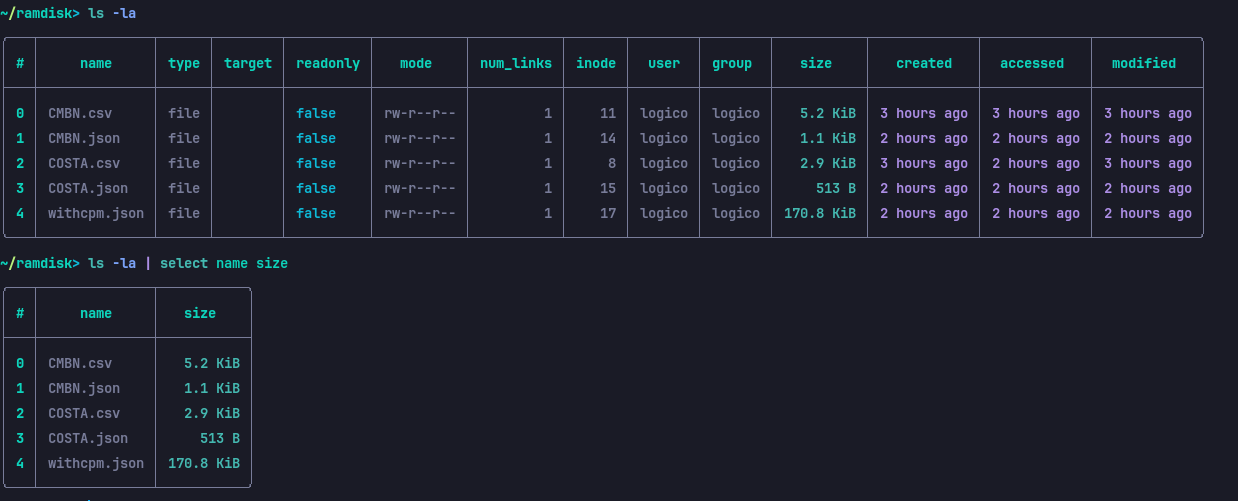
Not only structured files but also regular output like ls can be
treated as tables. For example, instead of running ls -lh | awk '{print $9"\t"$5}'
to get a table of file names and their corresponding sizes, in
Nushell it translates to ls -la | select name size
Advantages that make the difference
Structured Data Processing
Nushell handles structured data in the form of tables and JSON objects. This makes tasks like these easy:
- Filtering data with precision.
- Converting formats (CSV, JSON, YAML, etc.) without external tools.
- Exploring and transforming tabular data with a readable, concise syntax.
A natural fit for APIs and modern tools
If you’re reading this, chances are you regularly have to work with REST APIs and formats like JSON. Nushell is a joy
http get https://restcountries.com/v3.1/all?fields=name | get name | select common nativeName | sort | first 3
No need for cURL or wget, or remembering jq’s syntax — this shell
takes care of everything.
Intuitive integration with other tools
Nushell keeps an interpreter’s basic functionality, like navigating directories,
running system commands and managing processes. However, it extends these
capabilities with built-in commands that understand the context of the data,
significantly improving the experience. So there’s no big deal
if you want to use jq instead of the native commands.
Clear documentation and an active community
For developers like me who are after efficiency, Nushell offers well-structured documentation and an active community, which speeds up the learning curve and helps adoption.
Zsh or Nushell? Both
Nushell is a tool for processing data first and being a shell after. This means you can use Nushell for complex data processing tasks such as analysis, manipulation and data visualization.
In my particular case, I’m going to keep using Zsh, but whenever I have to process information, this tool will be my first choice. And who knows — maybe I’ll end up adopting it as my main shell?
If you’re used to traditional interpreters like Bash or Zsh, you may need some time to adjust to Nushell. However, once you get used to it, you’ll find it’s a valuable tool you can use for a variety of tasks.